# Sending Funds

1. From the Talisman popup, click on send

<div align="left"><figure><img src="https://2012041694-files.gitbook.io/~/files/v0/b/gitbook-x-prod.appspot.com/o/spaces%2F2G9cEppDnwuwiGautnGv%2Fuploads%2F5hZnlvBmEfuGnYU8Ypdl%2FSend%20Funds%20Send%20Button%20Popup.png?alt=media&#x26;token=a6f9b6f3-109b-4132-89b7-712a25fb84b1" alt="" width="375"><figcaption></figcaption></figure></div>

Or you can select click the “send” button from the account view.&#x20;

{% columns %}
{% column %}

<figure><img src="https://2012041694-files.gitbook.io/~/files/v0/b/gitbook-x-prod.appspot.com/o/spaces%2F2G9cEppDnwuwiGautnGv%2Fuploads%2F2rD8ixMM8WJkx5GSz6qX%2FSend%20Funds%20Solana%20Individual%20Account.png?alt=media&#x26;token=c498e86e-1467-419f-94ec-4fea2e02470d" alt=""><figcaption></figcaption></figure>
{% endcolumn %}

{% column %}

<figure><img src="https://2012041694-files.gitbook.io/~/files/v0/b/gitbook-x-prod.appspot.com/o/spaces%2F2G9cEppDnwuwiGautnGv%2Fuploads%2FHMWnGtOE6nLYNFm3tjfH%2Fsend%20funds%20send%20icon%20in%20account.png?alt=media&#x26;token=d0345b46-21b1-4e65-9388-dfdc5bceecdd" alt=""><figcaption></figcaption></figure>
{% endcolumn %}
{% endcolumns %}

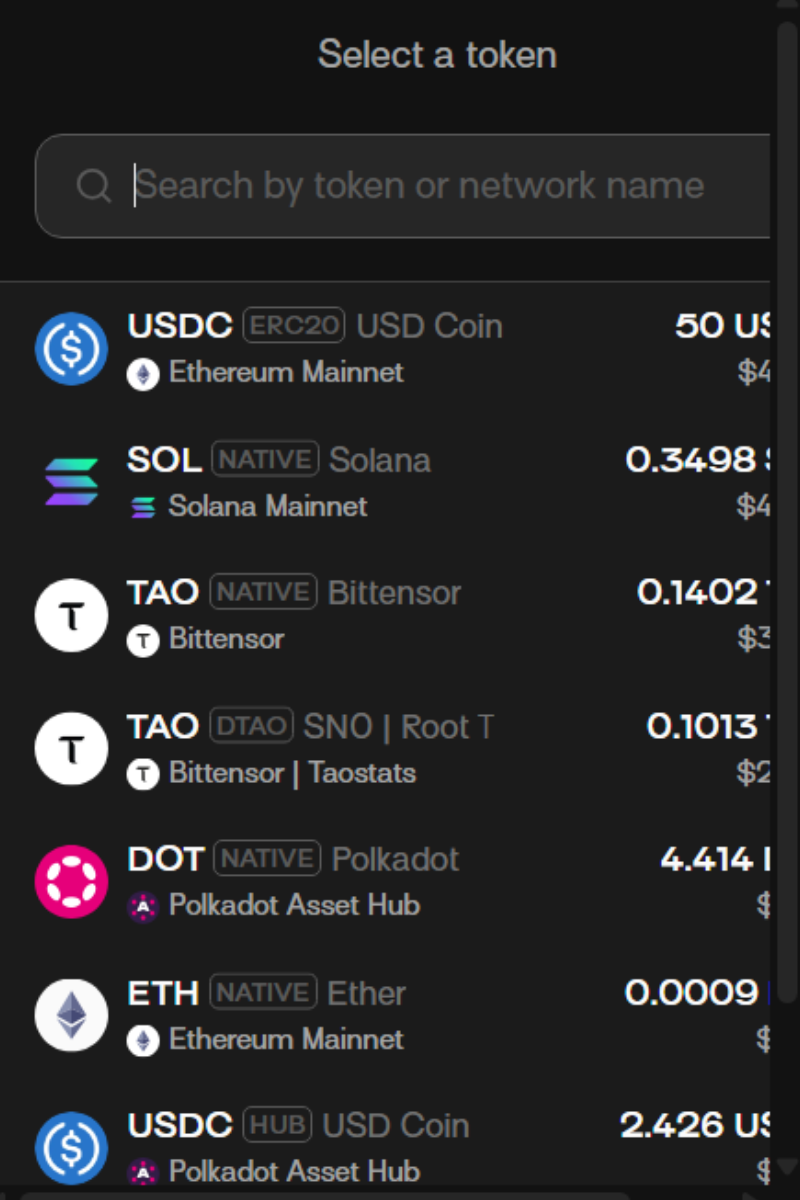
2. Choose the asset you’d like to send. To make it easier, you may follow the steps in the tab below based on what chain you’re sending an asset on.

<div align="left"><figure><img src="https://2012041694-files.gitbook.io/~/files/v0/b/gitbook-x-prod.appspot.com/o/spaces%2F2G9cEppDnwuwiGautnGv%2Fuploads%2FZLxCHRSAH0NmGQxvsUwI%2Funknown.png?alt=media&#x26;token=647f5a57-25ec-43fc-aa25-a33843c3e1ef" alt="" width="375"><figcaption></figcaption></figure></div>

{% tabs %}
{% tab title="EVM" %}
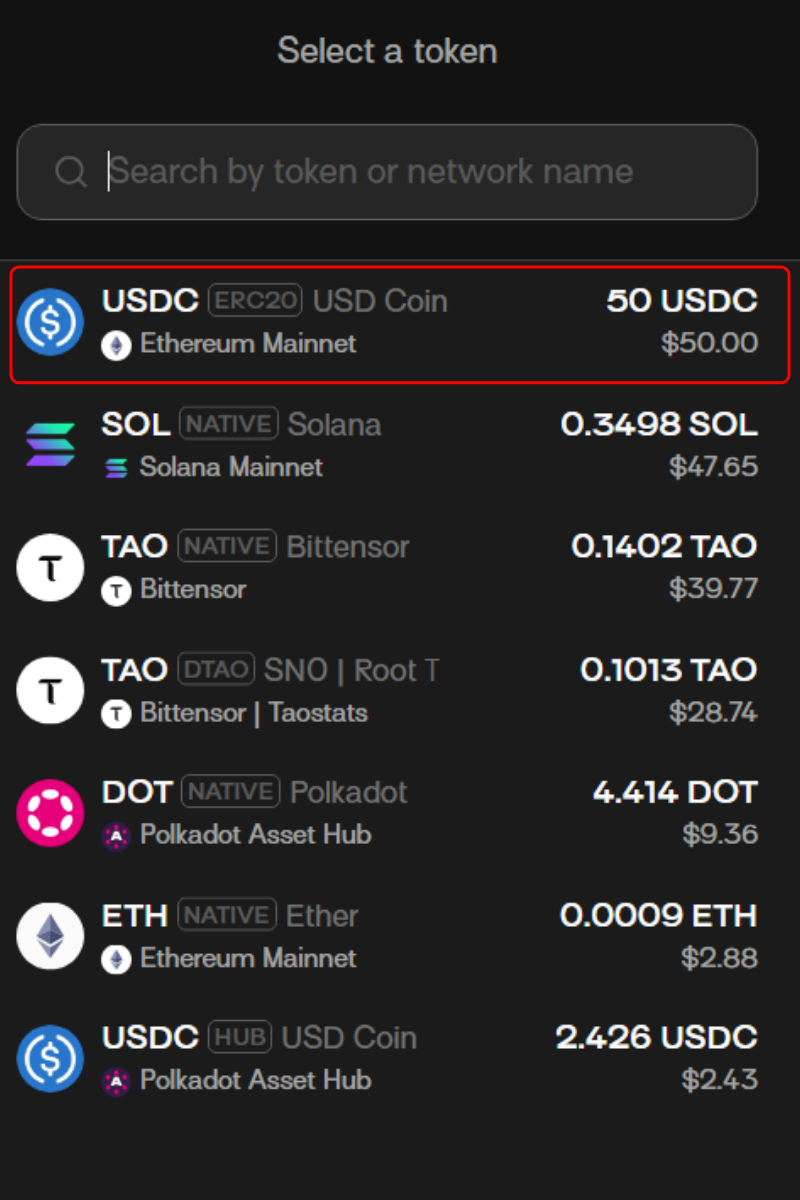
3\. Choose the asset you’d like to send (eg. USDC on Ethereum).

<div align="left"><figure><img src="https://2012041694-files.gitbook.io/~/files/v0/b/gitbook-x-prod.appspot.com/o/spaces%2F2G9cEppDnwuwiGautnGv%2Fuploads%2FmmcXq0RVaC7Z776dZRmb%2Funknown.png?alt=media&#x26;token=a37c0473-8767-4e5d-abf4-86ac159ad2bd" alt="" width="375"><figcaption></figcaption></figure></div>

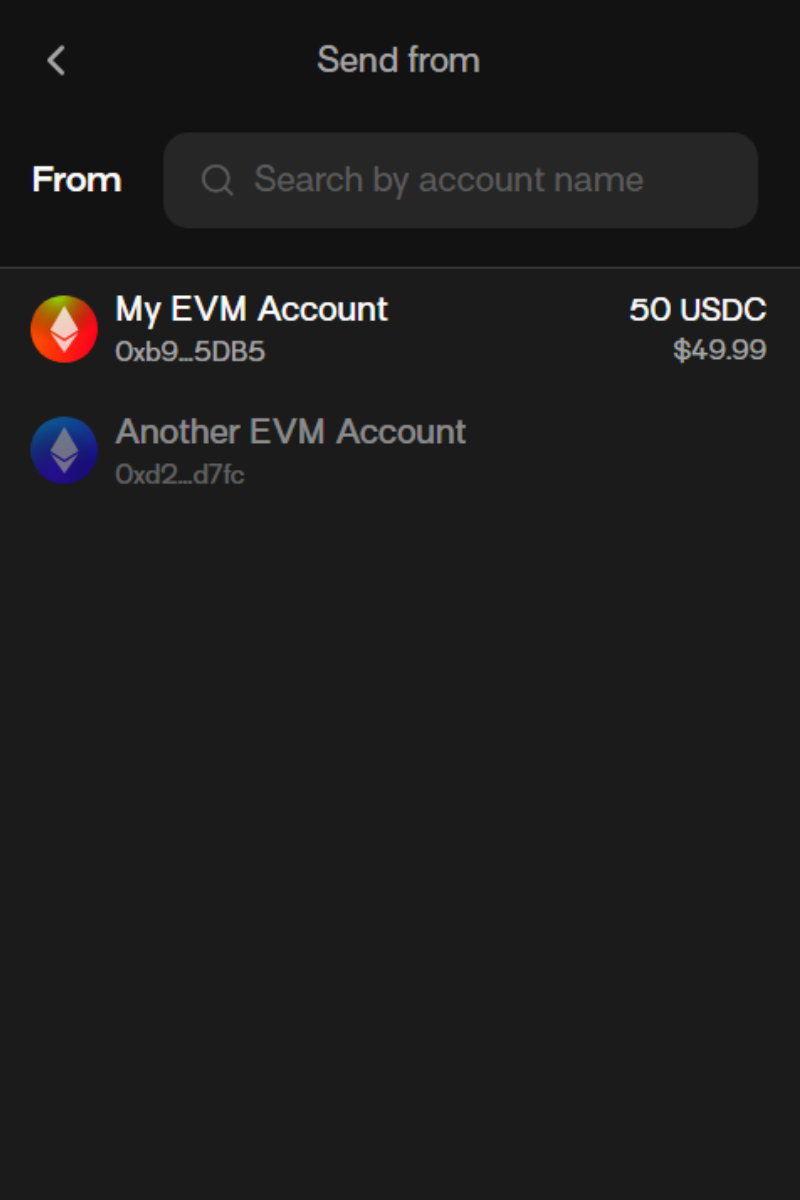
4. Select which account you’d like to send the token FROM.

<div align="left"><figure><img src="https://2012041694-files.gitbook.io/~/files/v0/b/gitbook-x-prod.appspot.com/o/spaces%2F2G9cEppDnwuwiGautnGv%2Fuploads%2F4OqTad7yTMCg7jmP8QaX%2Funknown.png?alt=media&#x26;token=0351df35-25d0-47e5-a7d7-6cf8596491e5" alt="" width="375"><figcaption></figcaption></figure></div>

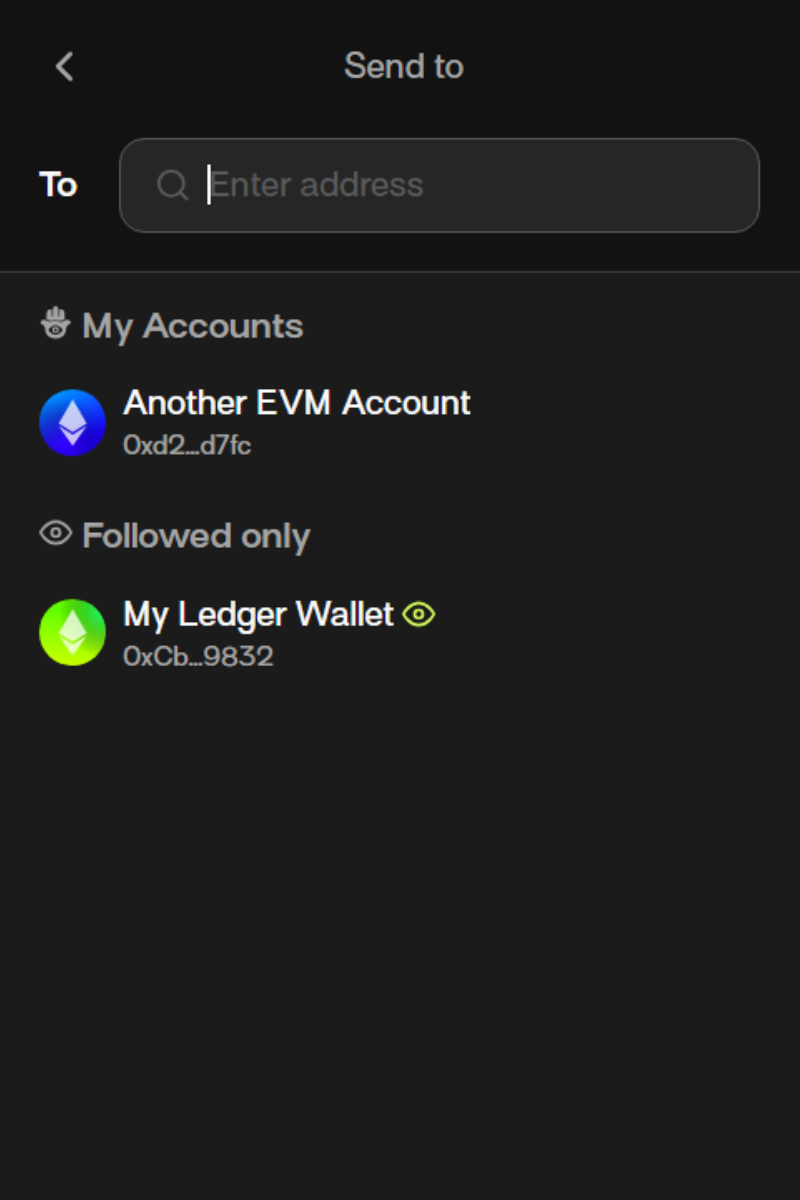
5. Input the address that will RECEIVE the token that you’re sending.\
   Note:  Please ensure that the receiving address matches the network you are sending the token on, to avoid losing your funds or unwanted transfers. For example, when sending USDC on Ethereum, the address should be an Ethereum address (not another network).

<div align="left"><figure><img src="https://2012041694-files.gitbook.io/~/files/v0/b/gitbook-x-prod.appspot.com/o/spaces%2F2G9cEppDnwuwiGautnGv%2Fuploads%2FMLGDYefA9ud0Mb7kYg6J%2Funknown.png?alt=media&#x26;token=eeff96bd-a02d-4e7b-ad34-abea629c4682" alt="" width="375"><figcaption></figcaption></figure></div>

6. Input the amount of token you’d like to send and click “Review”.

<div align="left"><figure><img src="https://2012041694-files.gitbook.io/~/files/v0/b/gitbook-x-prod.appspot.com/o/spaces%2F2G9cEppDnwuwiGautnGv%2Fuploads%2FhwndrXiTMc0ohG0b8YZu%2Funknown.png?alt=media&#x26;token=54e084c0-0b57-4f3b-a49e-2f42cb7fe116" alt="" width="375"><figcaption></figcaption></figure></div>

7. Carefully review the transactions and click “Confirm”.

<div align="left"><figure><img src="https://2012041694-files.gitbook.io/~/files/v0/b/gitbook-x-prod.appspot.com/o/spaces%2F2G9cEppDnwuwiGautnGv%2Fuploads%2Fe15CtCAqJ65yYafZrSae%2Funknown.png?alt=media&#x26;token=2e1ab281-5007-43dc-9aea-fa56f9a858e6" alt="" width="375"><figcaption></figcaption></figure></div>

Congrats, you’ve now successfully transferred funds from your Talisman wallet!
{% endtab %}

{% tab title="Solana" %}
3\. Choose the asset you’d like to send (eg. SOL).

<div align="left"><figure><img src="https://2012041694-files.gitbook.io/~/files/v0/b/gitbook-x-prod.appspot.com/o/spaces%2F2G9cEppDnwuwiGautnGv%2Fuploads%2FbHMCujZOogQOmF91Ng42%2Funknown.png?alt=media&#x26;token=6557a70d-cfc4-4a42-ace7-8c265fc53b24" alt="" width="375"><figcaption></figcaption></figure></div>

4. Select which account you’d like to send the token FROM.

<div align="left"><figure><img src="https://2012041694-files.gitbook.io/~/files/v0/b/gitbook-x-prod.appspot.com/o/spaces%2F2G9cEppDnwuwiGautnGv%2Fuploads%2FRYE5O25K32e75jMnZbOA%2Funknown.png?alt=media&#x26;token=bbe3b495-546f-4479-8e25-d09a7fff8a03" alt="" width="375"><figcaption></figcaption></figure></div>

5. Input the address that will RECEIVE the token that you’re sending.\
   **Note:** Please ensure that the receiving address matches the network you are sending the token on. For example, when sending SOL natively, the address should be a Solana address. If you choose an address of another network, it can result in unwanted transfers or loss of funds.

<div align="left"><figure><img src="https://2012041694-files.gitbook.io/~/files/v0/b/gitbook-x-prod.appspot.com/o/spaces%2F2G9cEppDnwuwiGautnGv%2Fuploads%2FD5UIdpc5WLizCN8nyBEc%2Funknown.png?alt=media&#x26;token=fe20dc79-f226-4867-a60b-53c218439fe5" alt="" width="375"><figcaption></figcaption></figure></div>

6. Input the amount of token you’d like to send and click “Review”.

<div align="left"><figure><img src="https://2012041694-files.gitbook.io/~/files/v0/b/gitbook-x-prod.appspot.com/o/spaces%2F2G9cEppDnwuwiGautnGv%2Fuploads%2FjBDwGwFHx8Z3E9MPDKfr%2Funknown.png?alt=media&#x26;token=73464abb-731d-47ea-8bc5-dfd19a1fb7bb" alt="" width="375"><figcaption></figcaption></figure></div>

7. Carefully review the transactions and click “Confirm”.

<div align="left"><figure><img src="https://2012041694-files.gitbook.io/~/files/v0/b/gitbook-x-prod.appspot.com/o/spaces%2F2G9cEppDnwuwiGautnGv%2Fuploads%2FF2BYHCWYw34QgPcsp9x7%2Funknown.png?alt=media&#x26;token=c82b733b-6e4c-4aa4-bd58-c57aaea616ce" alt="" width="375"><figcaption></figcaption></figure></div>

Congrats, you’ve now successfully transferred funds from your Talisman wallet!
{% endtab %}

{% tab title="Substrate" %}
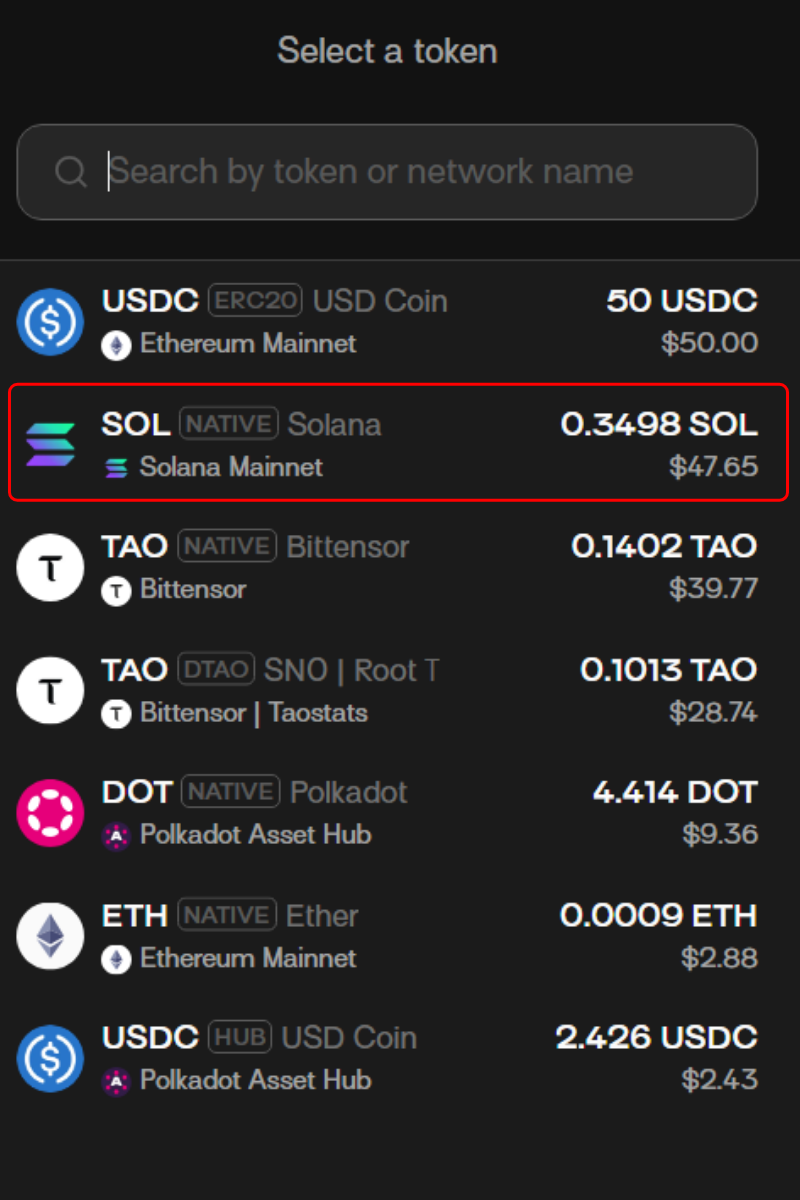
3\.  Choose the asset you’d like to send from the dropdown menu or search for the token using the search box. (eg. TAO, DOT). In this example, we’ll use TAO on Bittensor.<br>

```
<div align="left"><figure><img src="https://2012041694-files.gitbook.io/~/files/v0/b/gitbook-x-prod.appspot.com/o/spaces%2F2G9cEppDnwuwiGautnGv%2Fuploads%2FmSzz7etyQBZDyHCvewto%2Funknown.png?alt=media&#x26;token=33cffc04-557c-4504-9fce-a28e55785a5d" alt="" width="375"><figcaption></figcaption></figure></div>
```

4\.  Select which account you’d like to send the token FROM.<br>

```
<div align="left"><figure><img src="https://2012041694-files.gitbook.io/~/files/v0/b/gitbook-x-prod.appspot.com/o/spaces%2F2G9cEppDnwuwiGautnGv%2Fuploads%2F8LeK9iOzAFAcHwyAw6Nz%2Funknown.png?alt=media&#x26;token=02126f52-bfb8-4170-974a-af98a21e344e" alt="" width="375"><figcaption></figcaption></figure></div>
```

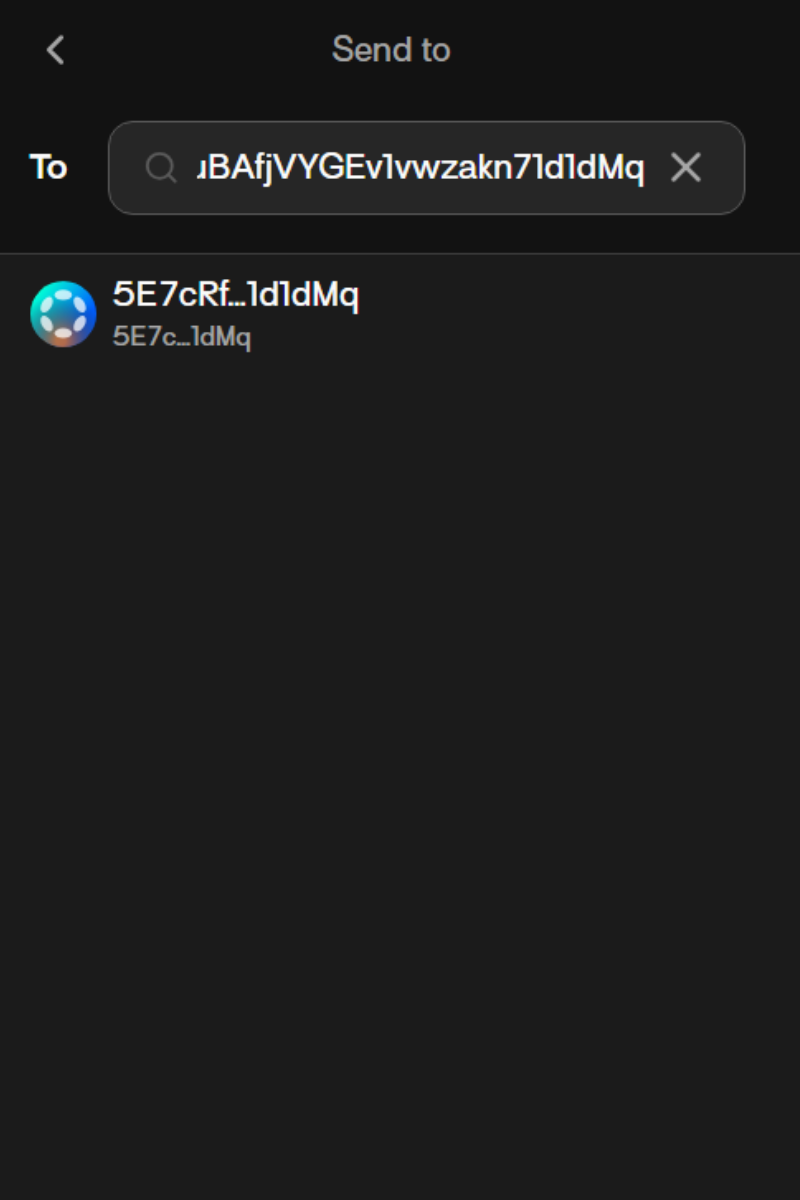
5\. Input the address that will RECEIVE the token that you’re sending.\
Note:  Please ensure that the receiving address matches the network you are sending the token on, to avoid losing your funds or unwanted transfers. For example, if you’d like to send TAO on Bittensor, the address should be a BIttensor address.&#x20;

<div align="left"><figure><img src="https://2012041694-files.gitbook.io/~/files/v0/b/gitbook-x-prod.appspot.com/o/spaces%2F2G9cEppDnwuwiGautnGv%2Fuploads%2F3Bu0sVM3YH75f5GOd8Oz%2Funknown.png?alt=media&#x26;token=a4a4e6fe-d4ef-4660-83f3-ea41702f6e1d" alt="" width="375"><figcaption></figcaption></figure></div>

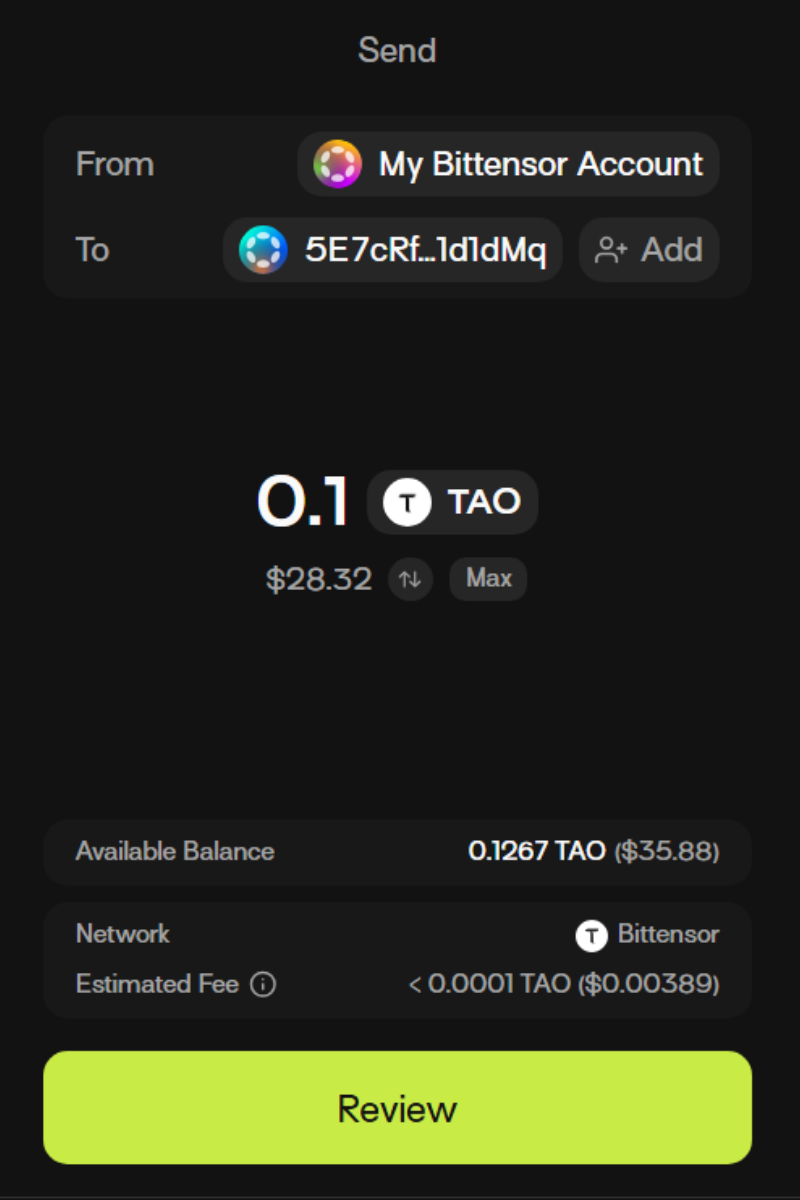
6. Input the amount of token you’d like to send and click “Review”.

<div align="left"><figure><img src="https://2012041694-files.gitbook.io/~/files/v0/b/gitbook-x-prod.appspot.com/o/spaces%2F2G9cEppDnwuwiGautnGv%2Fuploads%2FROIqsSPdq89RlyJqJP0l%2Funknown.png?alt=media&#x26;token=09d68a8e-dfe1-4a5b-bbe7-4d8b43f66331" alt="" width="375"><figcaption></figcaption></figure></div>

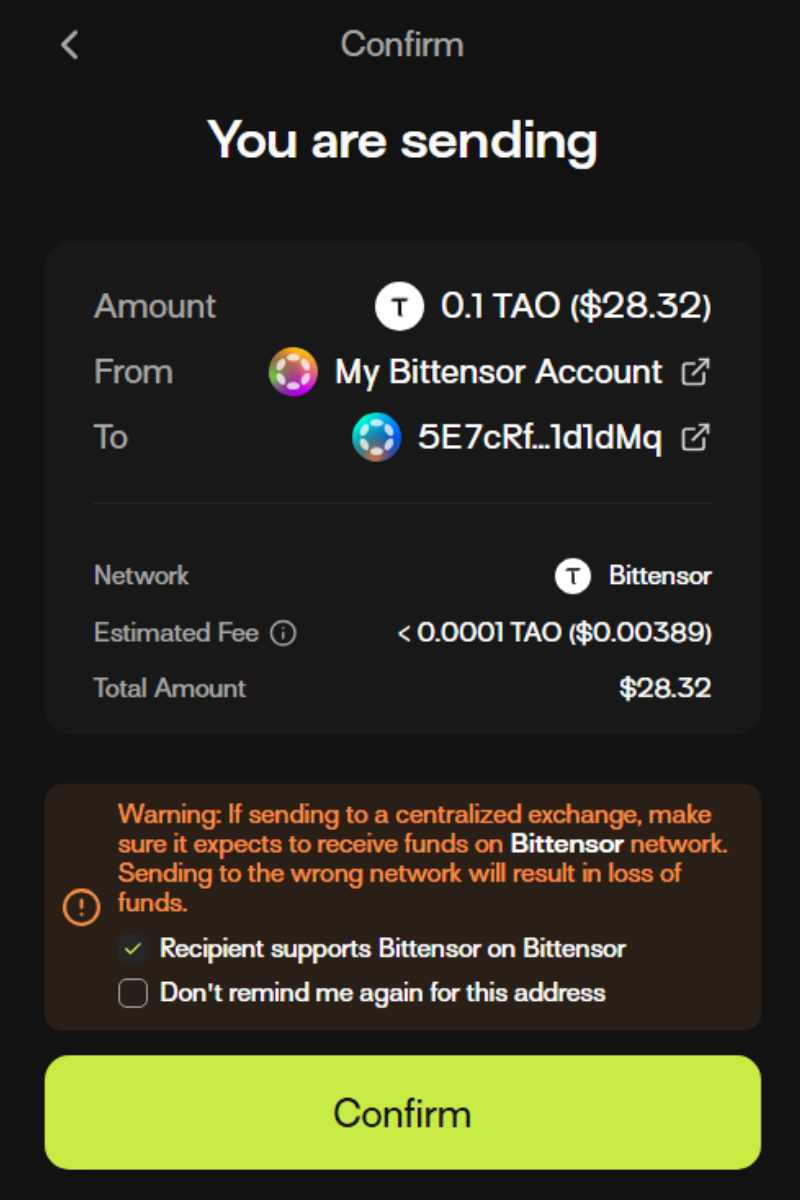
7. Read the safety notice and click “Confirm.”\
   \
   NOTE: Please ensure that you are sending your funds to the correct network. If you send your funds to wrong network, this will result in a loss of funds.

<div align="left"><figure><img src="https://2012041694-files.gitbook.io/~/files/v0/b/gitbook-x-prod.appspot.com/o/spaces%2F2G9cEppDnwuwiGautnGv%2Fuploads%2FMRataG1DMvKAq4skZhp5%2Funknown.png?alt=media&#x26;token=019e1458-a959-41ed-baf8-57595c06fa0e" alt="" width="375"><figcaption></figcaption></figure></div>

Congrats, you’ve now successfully transferred funds from your Talisman wallet!
{% endtab %}
{% endtabs %}

v 3.1.16