> For the complete documentation index, see [llms.txt](https://docs.talisman.xyz/talisman/llms.txt). Markdown versions of documentation pages are available by appending `.md` to page URLs; this page is available as [Markdown](https://docs.talisman.xyz/talisman/customize/customizing-talisman/quick-settings.md).
# Quick Settings
Customize your Talisman wallet with quick settings for language, currency, auto-lock, and balance display options.
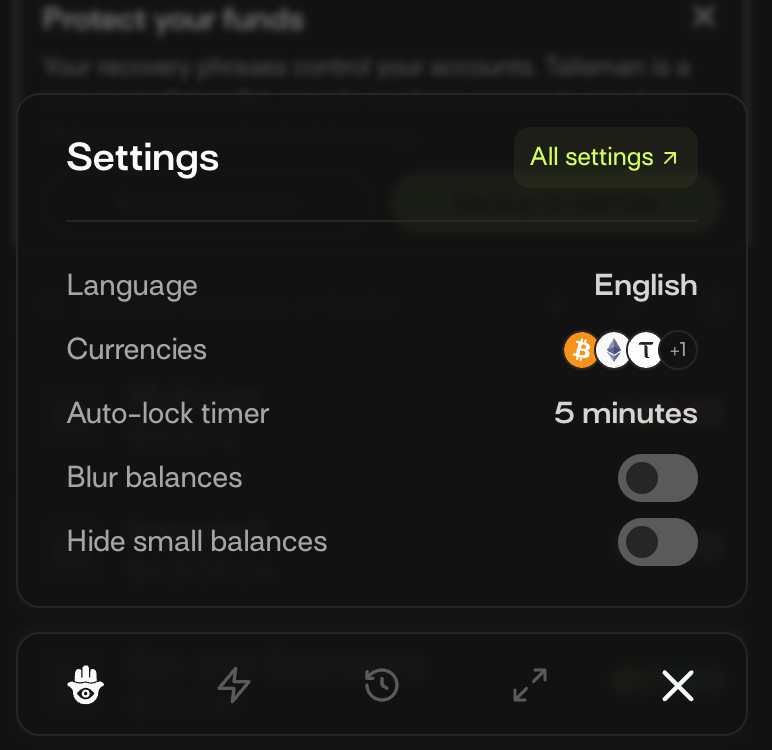
For easy access to commonly used wallet settings, you can access the quick settings menu directly from the wallet home page.
{% columns %}
{% column %}
{% endcolumn %}
{% column %}
{% endcolumn %}
{% endcolumns %}
**All Settings**
This button takes you to the “General” settings page in your Talisman extension.
**Languages**
[This option](https://docs.talisman.xyz/talisman/customize/customizing-talisman/multi-language-support) allows you to change to your preferred language quickly.
**Currencies**
Choose your[ favorite currencies](https://docs.talisman.xyz/talisman/customize/customizing-talisman/multi-currency-display) directly from your portfolio.
**Auto-lock timer**
Set a timer to lock your Talisman wallet following a period of inactivity.
**Blur Balances**
Toggle On “Blur Balances” to blur the asset balances on your profile.
**Hide small balances**
Toggle this option on and balances under $1 will be hidden.