> For the complete documentation index, see [llms.txt](https://docs.talisman.xyz/talisman/llms.txt). Markdown versions of documentation pages are available by appending `.md` to page URLs; this page is available as [Markdown](https://docs.talisman.xyz/talisman/bittensor-features/stake-tao-trade-dtao/view-tao-and-dtao-staking-positions.md).
# View TAO and dTAO Staking Positions
View and manage your TAO and dTAO staking positions in Talisman.
Talisman allows you to view and manage your TAO staking positions directly from your wallet. This includes TAO staked on Root as well as TAO staked on dTAO subnets.
This guide explains where your staking positions appear and how they are displayed within your Bittensor account.
#### Open Your Bittensor Account
1. From the wallet, click the arrow to access your total portfolio.

You can also select an individual Bittensor account.
{% columns %}
{% column %}

{% endcolumn %}
{% column %}

{% endcolumn %}
{% endcolumns %}
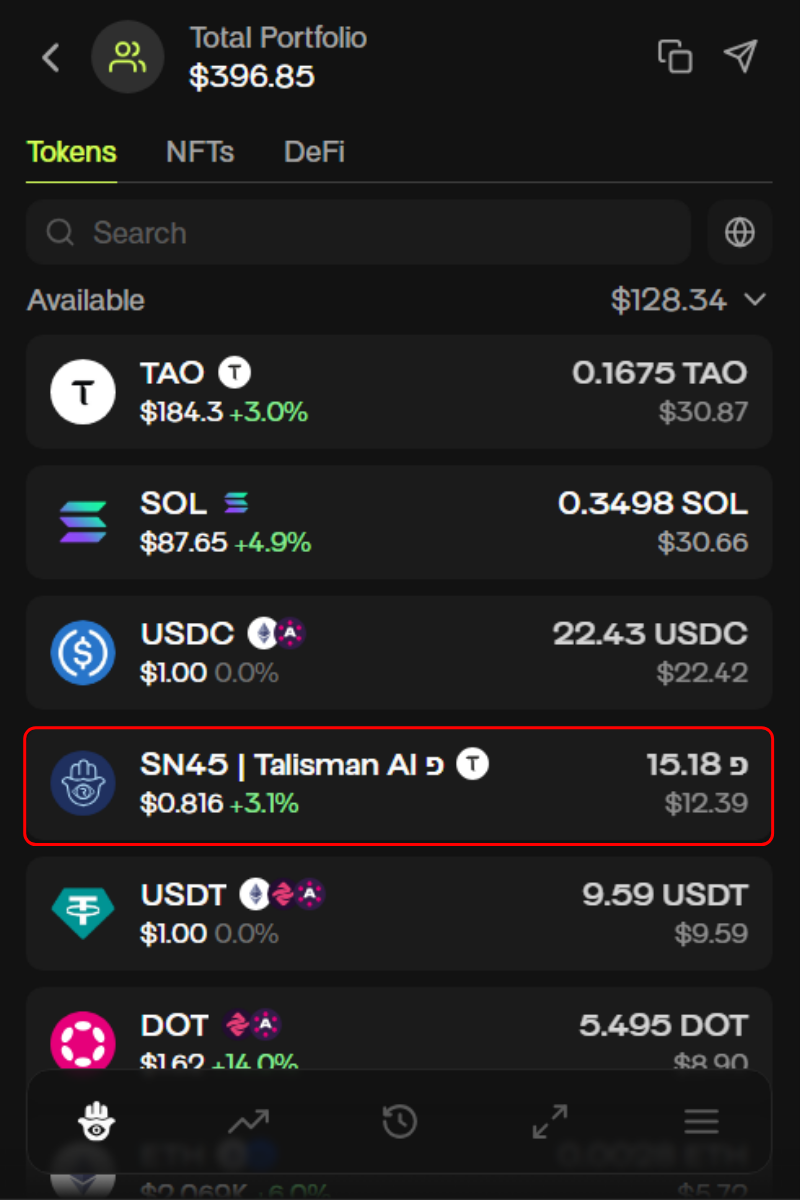
2. All your assets will appear in the total portfolio view, including TAO and subnet tokens.
#### Viewing Root TAO Staking
If you have staked TAO on Root, your Root staking position will appear under the TAO asset.
Click on the TAO token to view more details. Your Root staking position will be shown within the TAO asset view.
#### Viewing dTAO / Subnet Staking Positions
If you have staked/swapped to subnets, each subnet position appears as a separate alpha token in your wallet.
These subnet alpha tokens are listed individually in your asset list. For example, staking to Subnet 45 will display as an SN45 alpha token.
Click on a specific subnet alpha token to view its staking details.
{% columns %}
{% column %}
{% endcolumn %}
{% column %}
{% endcolumn %}
{% endcolumns %}
#### Multiple Staking Positions
You can have multiple staking positions at the same time, including:
* TAO staked on Root
* TAO staked on multiple dTAO subnets
Within each Root or subnet staking position, you can also have multiple validator allocations. This means you may be staking to more than one validator under the same asset.
Select the asset to view all associated validator positions.
{% columns %}
{% column %}

{% endcolumn %}
{% column %}

{% endcolumn %}
{% endcolumns %}