# Stake/Swap on dTAO Subnets

The process for staking/swapping to subnets, and [staking TAO on root](https://docs.talisman.xyz/talisman/bittensor-features/stake-tao-trade-dtao/stake-tao-on-root), are very similar. For dTAO you will need to choose a subnet, and will receive alpha tokens for each respective subnet you stake to. Staking to a subnet can also be considered swapping to the subnet alpha token. When staking to a subnet, note that there is price risk associated with exposure to the alpha token price (not the case for root staking).&#x20;

In this example, we will  stake to Subnet 45.

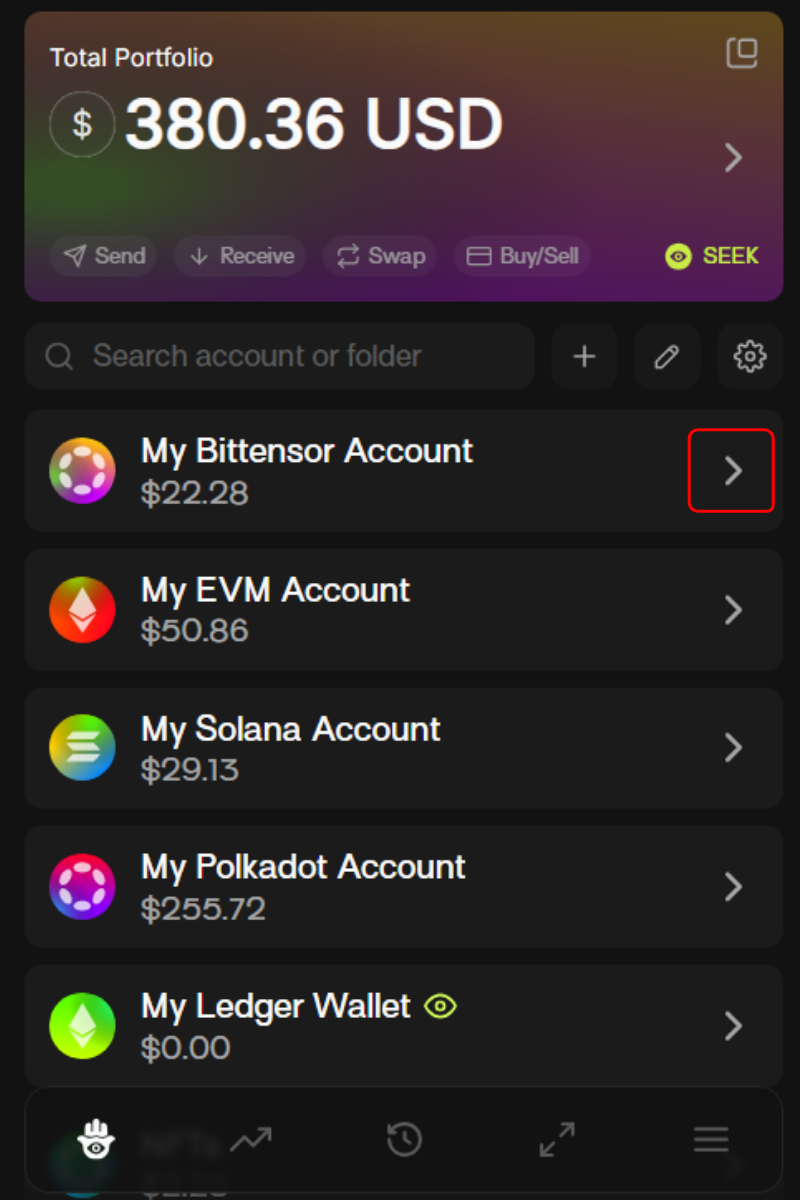
1. From the wallet, choose your preferred Bittensor account.

<div align="left"><figure><img src="https://2012041694-files.gitbook.io/~/files/v0/b/gitbook-x-prod.appspot.com/o/spaces%2F2G9cEppDnwuwiGautnGv%2Fuploads%2F5hW7dom9EbBg1ZyQN4AS%2Funknown.png?alt=media&#x26;token=c6be2e91-6de6-4ced-804e-627cfedf1009" alt="" width="375"><figcaption></figcaption></figure></div>

2. Hover over your TAO token balance and choose ‘Stake’.

<div align="left"><figure><img src="https://2012041694-files.gitbook.io/~/files/v0/b/gitbook-x-prod.appspot.com/o/spaces%2F2G9cEppDnwuwiGautnGv%2Fuploads%2FOPpnXW88FucW7GQPaloD%2Funknown.png?alt=media&#x26;token=c7db2c1e-f568-40cc-9cd4-f968406550ec" alt="" width="375"><figcaption></figcaption></figure></div>

3. Choose ‘Subnet DTAO’ as the staking type.

<div align="left"><figure><img src="https://2012041694-files.gitbook.io/~/files/v0/b/gitbook-x-prod.appspot.com/o/spaces%2F2G9cEppDnwuwiGautnGv%2Fuploads%2FlqqX8foOO1Hsv0DS07kE%2Funknown.png?alt=media&#x26;token=5677c250-156e-4a31-9096-921f32a13c1c" alt="" width="375"><figcaption></figcaption></figure></div>

4. Choose the amount you wish to stake, select your Subnet of choice, and select your Validator of choice.

{% columns %}
{% column %}
![](https://2012041694-files.gitbook.io/~/files/v0/b/gitbook-x-prod.appspot.com/o/spaces%2F2G9cEppDnwuwiGautnGv%2Fuploads%2F3b1xRITzExktvFAKn1Yh%2Funknown.png?alt=media\&token=a71435ef-9c42-4e71-a3e2-9479d3c6036d)<br>
{% endcolumn %}

{% column %}
![](https://2012041694-files.gitbook.io/~/files/v0/b/gitbook-x-prod.appspot.com/o/spaces%2F2G9cEppDnwuwiGautnGv%2Fuploads%2FQFFO9XYC809GsaSjQLkH%2Funknown.png?alt=media\&token=a4ac5bef-5e0c-428a-b11b-5de45ce1827d)
{% endcolumn %}
{% endcolumns %}

5. You can select your validator of choice by clicking the validator pill.

{% columns %}
{% column %}
![](https://2012041694-files.gitbook.io/~/files/v0/b/gitbook-x-prod.appspot.com/o/spaces%2F2G9cEppDnwuwiGautnGv%2Fuploads%2Fv7vq2msZa4BSgn0hxRvW%2Funknown.png?alt=media\&token=279838da-0982-431f-8412-5cc7c4d1ec4b)
{% endcolumn %}

{% column %}
![](https://2012041694-files.gitbook.io/~/files/v0/b/gitbook-x-prod.appspot.com/o/spaces%2F2G9cEppDnwuwiGautnGv%2Fuploads%2Fnyj6WjwEmQd8sIqRW2NU%2Funknown.png?alt=media\&token=e9d575e7-ef4b-4bde-aa57-af0cc06f63a8)
{% endcolumn %}
{% endcolumns %}

6. Review the transactions and click confirm.

Toggle on the [MEV Shield](https://docs.talisman.xyz/talisman/bittensor-features/stake-tao-trade-dtao/mev-shield) for protection against MEV Bots.

<div align="left"><figure><img src="https://2012041694-files.gitbook.io/~/files/v0/b/gitbook-x-prod.appspot.com/o/spaces%2F2G9cEppDnwuwiGautnGv%2Fuploads%2FcjgasNvzeWhGsmNtrgco%2Funknown.png?alt=media&#x26;token=25817605-47e6-452c-a4ed-fc267a4b7b5c" alt="" width="375"><figcaption></figcaption></figure></div>

You’ll be prompted to accept the subnet staking warning.

<div align="left"><figure><img src="https://2012041694-files.gitbook.io/~/files/v0/b/gitbook-x-prod.appspot.com/o/spaces%2F2G9cEppDnwuwiGautnGv%2Fuploads%2Fepkgwa9NqresKLtZREqp%2Funknown.png?alt=media&#x26;token=d65674ce-b9dd-4de6-b7d3-14f5d0a2da7a" alt="" width="375"><figcaption></figcaption></figure></div>

7. Once your transaction is successful, you’ll see a screen like this.

<div align="left"><figure><img src="https://2012041694-files.gitbook.io/~/files/v0/b/gitbook-x-prod.appspot.com/o/spaces%2F2G9cEppDnwuwiGautnGv%2Fuploads%2FbSonAKKVqg9zcSccm1LQ%2Funknown.png?alt=media&#x26;token=7d851c15-26e3-4dd6-b4d0-130557806d3f" alt="" width="375"><figcaption></figcaption></figure></div>

V3.2.0